Setting modeling parameters
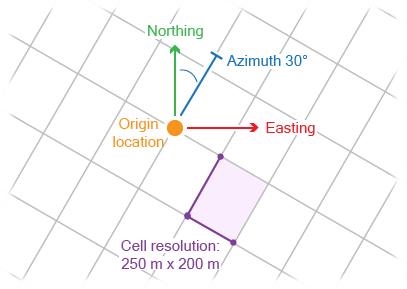
Model area example (top view) click to enlarge
After assigning data to your 3D structural model you will use the Set Modeling Parameters form (model > 3D Structure > Set Modeling Parameters) to specify the modeling parameters: origin location, orientation, and resolution. These parameters define an indefinite modeling grid, which determines the resolution of constructed surfaces (faults and horizons) in subsequent modeling steps.
It is important to note that when a fault model is included in the 3D structural model, the structural model will by definition use the same parameters as the fault model to ensure modeling parameter consistency. On the form, the Fault Model tab of the Modeling Parameters section is automatically selected and it is not possible to change the parameters, they are grayed out.
Otherwise, if no fault model is included in the structural model, you have two options:
- You can take existing modeling parameters from various sources by selecting one of the following tabs on the form: Seismic Survey, Fault Model, Area, 2D Grid. If you select one of these sources, the modeling parameters in the lower part of the form are automatically filled in, based on the parameters of the selected source.
- In the 3D View, you can rotate the area box by using the space key and left mouse button. This way you can optimally align the area with your data and structural features.
- Determine an appropriate lateral setting. The area graphically shows the resolution and previews the number of lateral data points.
- You can manually set your preferred modeling parameters by selecting the Manual tab; the modeling parameters at the lower part of the form are available for editing. In the Location and Orientation section, specify the Easting and Northing locations of the origin point, its TVDSS position and Azimuth(GN) (angle with the Northing direction) of the modeling grid. In the Resolution section, specify the sampling steps in the three directions by entering values for X increment, Y increment and Z increment.
To assist you in constraining the modeling parameters without a context to a seismic survey, it is recommend to use the Area tool. With this tool, you can interactively create an area box. This helps you with following tasks:
If you select one of the sources, you can optionally select the Optimize XYZ increments for modeling (not available when you select the Manual tab). Checking this box will optimize ('coarsen') the resolution of the modeling parameters according to the following rule:
- If the initial increment is < 66.6 m and you check the box, the application will calculate an integer multiplier to make the resolution as close to 100 m as possible. This 'coarsens' your resolution. For example, if your initial resolution is 20 m, the optimized resolution will be 100 m (the multiplier is 5). If your initial resolution is 30 m, the optimized resolution will be 90 m (the multiplier is 3).
- If the initial increment is ≥ 66.6 m and you check the box, then the optimize option will not do anything. For example, if your initial resolution is 70 m, it will stay 70 m; if your initial resolution is 250 m, it will stay 250 m, etc.
The settings on this form will be carried forward to the Constructing Surfaces step.
How to set the modeling parameters for the structural model
- Select the 3D structural model of interest. The associated stratigraphic and fault models are also listed on the adjacent factsheet
 .
. - Select the source from which you want to derive the modeling grid parameters, or set the parameters manually by selecting the Manual tab. See the explanations above for the various choices.
- Click OK to accept the parameters and proceed to Horizon Clean-up.